Battlefield 6
Main Menu Redesign
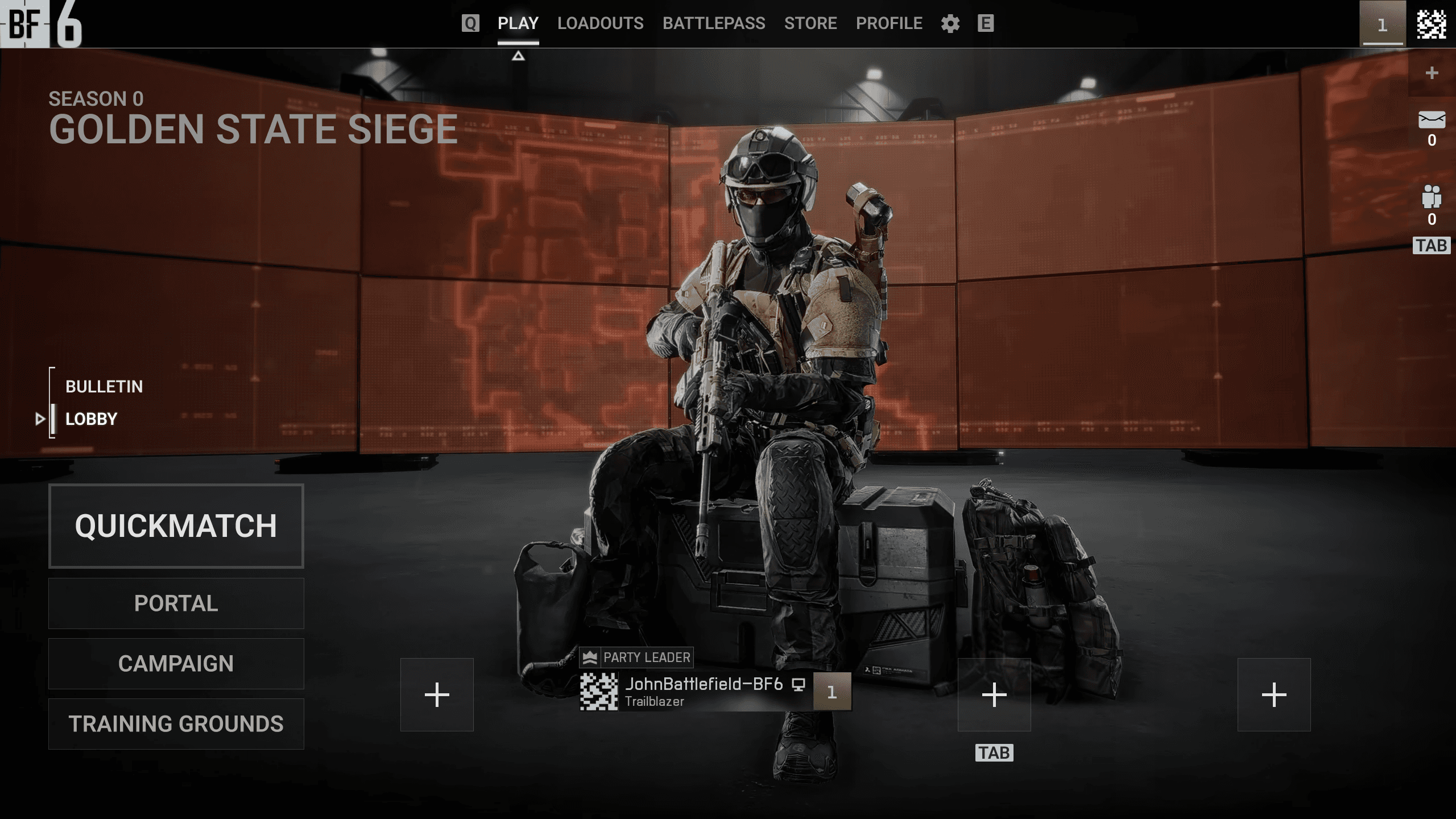
UI Designer
Figma
Solo
1 Month
In October 2025, DICE released the Battlefield 6 open beta to the public. The game's Netflix-inspired main menu design quickly drew criticism from players across Reddit and other forums. Recognizing this as a learning opportunity, I chose to redesign the controversial interface. This project served dual purposes: sharpening my UI/UX design skills by tackling a real-world problem with documented user feedback, and expanding my proficiency in Figma as my primary design tool.
In October 2025, DICE released the Battlefield 6 open beta to the public. The game's Netflix-inspired main menu design quickly drew criticism from players across Reddit and other forums. Recognizing this as a learning opportunity, I chose to redesign the controversial interface. This project served dual purposes: sharpening my UI/UX design skills by tackling a real-world problem with documented user feedback, and expanding my proficiency in Figma as my primary design tool.
The Original
/////////////////////////////////////////
////////////////////////
/////////////////////
Original Design breakdown
Before redesigning, I broke down the Main Menu's screen flow and individual screens to understand the decisions the original developers made.
Before redesigning, I broke down the Main Menu's screen flow and individual screens to understand the decisions the original developers made.
Screen Flow
I mapped out the screen flow, which helped me identify certain decisions made by the developers.
I mapped out the screen flow, which helped me identify certain decisions made by the developers.
The screen flow is well-structured and accomplishes its primary goal: getting players into a match efficiently. The one friction point I identified was the loadout customization path. Changing a weapon attachment requires navigating through three screens. However, I chose not to address this, assuming the flow would evolve as post-launch features were added. Instead, I focused on areas where I saw clearer opportunity.
The screen flow is well-structured and accomplishes its primary goal: getting players into a match efficiently. The one friction point I identified was the loadout customization path. Changing a weapon attachment requires navigating through three screens. However, I chose not to address this, assuming the flow would evolve as post-launch features were added. Instead, I focused on areas where I saw clearer opportunity.
Screen Breakdown
The Main Menu consists of two primary screens: game mode selection and the lobby. Selecting a mode transitions the player from the first to the second.
The Main Menu consists of two primary screens: game mode selection and the lobby. Selecting a mode transitions the player from the first to the second.
Screenshots taken from the original game
Screenshots taken from the original game
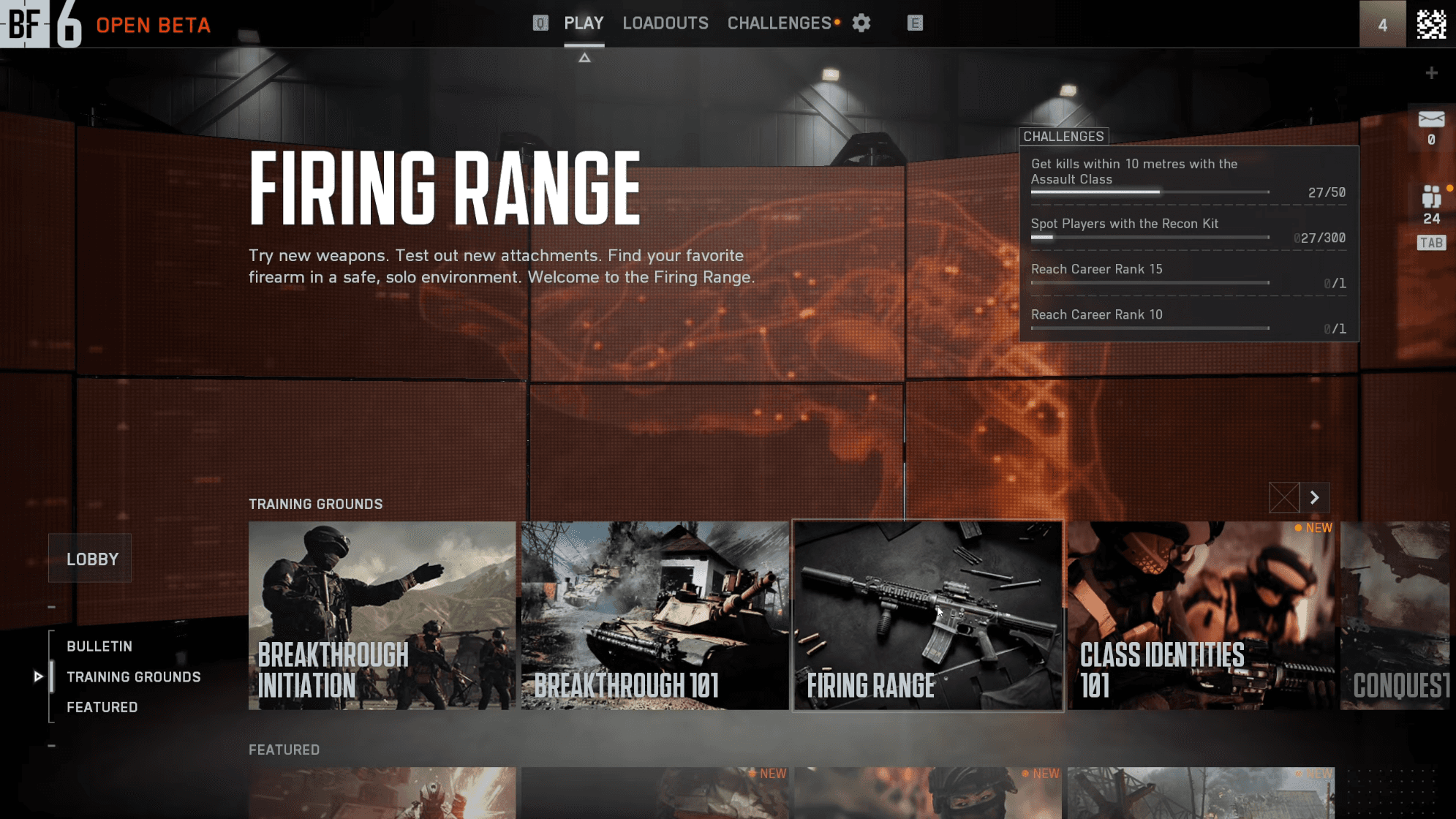
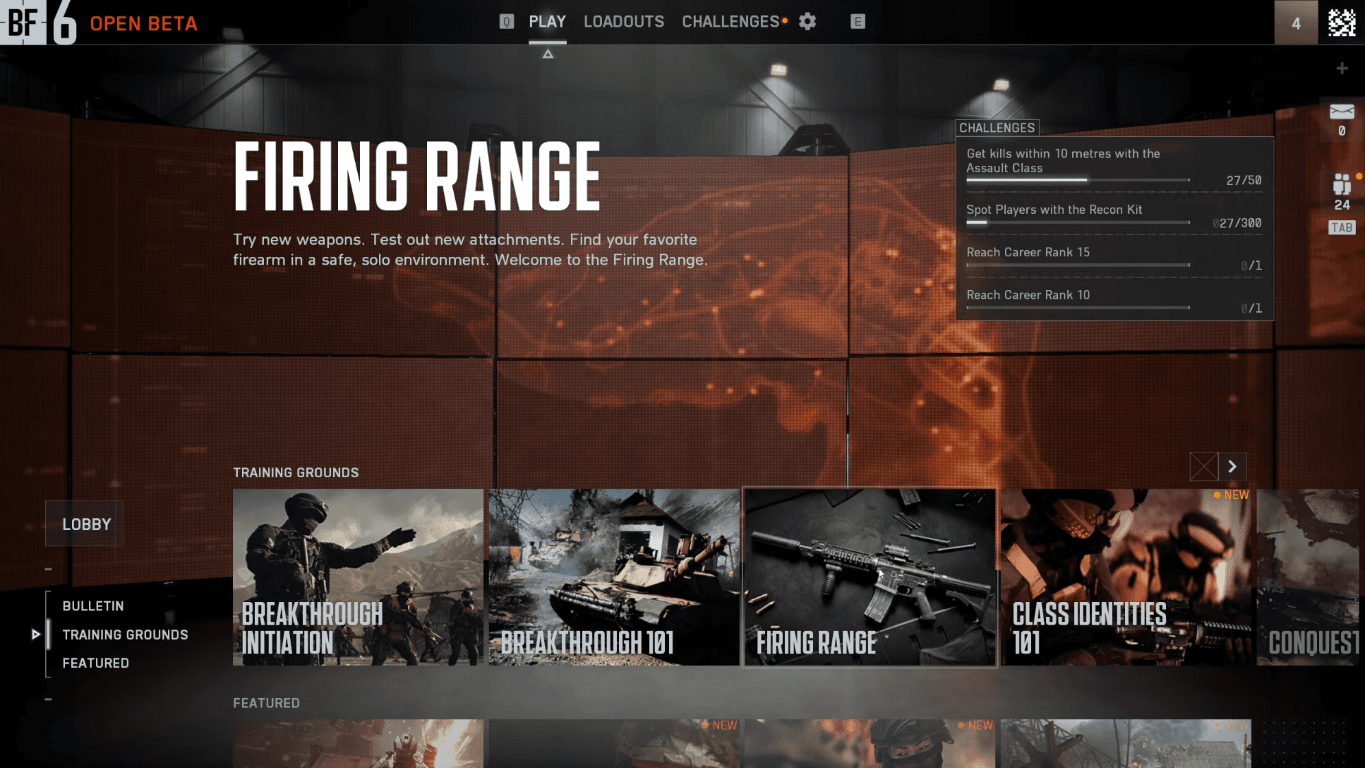
The game mode selection screen prioritizes game mode visibility. Each mode is contained within a tile that occupies roughly 5% of the screen. With four visible at once, it claims about 20% of the screen space in total. This approach likely targets console players viewing from a distance on large displays. Intentionally or not, the layout resembles streaming service interfaces, which use large artwork tiles to catch attention during browsing. In a gaming context, this pattern is less necessary; most players already know what mode they want and don't need to be sold on options.
The screen also features a bulletin section, which displays news, events, and other promotional content. It appears by default when the game launches, ensuring the player sees its contents first; whether they intend to read it or not.
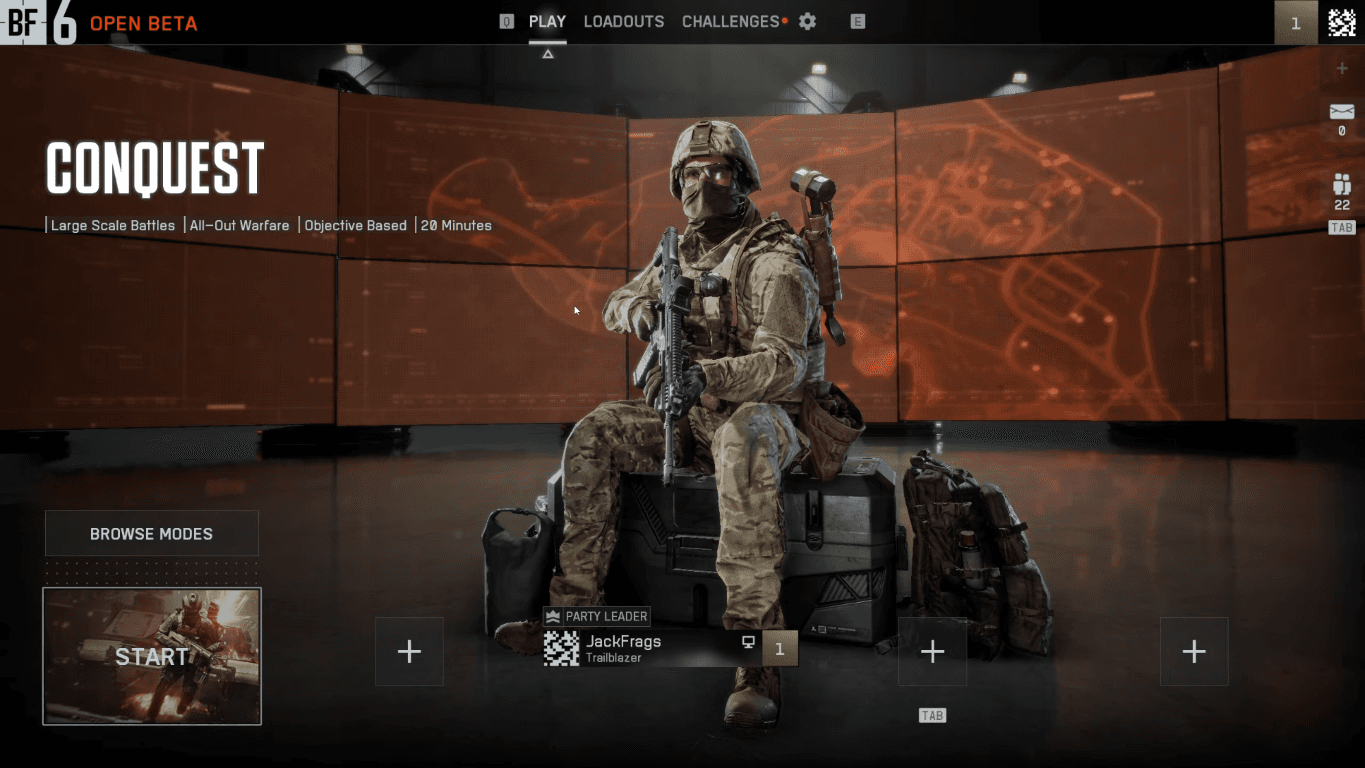
Once a mode is selected, the player transitions to the Lobby screen. The lobby itself is fairly standard for the genre. What's notable is its placement in the flow. This screen is hidden behind mode selection. Most comparable games do the opposite: lobby first, with mode selection accessed through a button. One possible explanation is that this structure lets the game surface the bulletin section immediately on launch without resorting to a pop-up ad. The player sees promotional content as part of the main screen rather than as an interruption to dismiss.
The game mode selection screen prioritizes game mode visibility. Each mode is contained within a tile that occupies roughly 5% of the screen. With four visible at once, it claims about 20% of the screen space in total. This approach likely targets console players viewing from a distance on large displays. Intentionally or not, the layout resembles streaming service interfaces, which use large artwork tiles to catch attention during browsing. In a gaming context, this pattern is less necessary; most players already know what mode they want and don't need to be sold on options.
The screen also features a bulletin section, which displays news, events, and other promotional content. It appears by default when the game launches, ensuring the player sees its contents first; whether they intend to read it or not.
Once a mode is selected, the player transitions to the Lobby screen. The lobby itself is fairly standard for the genre. What's notable is its placement in the flow. This screen is hidden behind mode selection. Most comparable games do the opposite: lobby first, with mode selection accessed through a button. One possible explanation is that this structure lets the game surface the bulletin section immediately on launch without resorting to a pop-up ad. The player sees promotional content as part of the main screen rather than as an interruption to dismiss.
Redesign Goals
My redesign focused on shifting the screens' priorities: creating a more conventional interface, moving away from the streaming service visual language, reducing the visual weight of mode selection, and designing screens absent from the Open Beta (Battle Pass, Store, and Profile).
One specific idea emerged from my analysis: merging the bulletin and lobby screens. This would keep players informed about in-game events without the experience feeling like dismissing pop-up ads before playing. The goal was to let players queue into a match without clicking through promotional content first, while still exposing them to it.
My redesign focused on shifting the screens' priorities: creating a more conventional interface, moving away from the streaming service visual language, reducing the visual weight of mode selection, and designing screens absent from the Open Beta (Battle Pass, Store, and Profile).
One specific idea emerged from my analysis: merging the bulletin and lobby screens. This would keep players informed about in-game events without the experience feeling like dismissing pop-up ads before playing. The goal was to let players queue into a match without clicking through promotional content first, while still exposing them to it.
I want to acknowledge that I was working with limited information. I didn't know DICE's post-launch plans, how many modes would be added, what the directors wanted to emphasize, or what technical constraints existed. My redesign is an exploration based on what was visible in the Beta, not a claim that I've solved problems the original team couldn't.
I want to acknowledge that I was working with limited information. I didn't know DICE's post-launch plans, how many modes would be added, what the directors wanted to emphasize, or what technical constraints existed. My redesign is an exploration based on what was visible in the Beta, not a claim that I've solved problems the original team couldn't.
Research
To inform my design direction, I researched main menus from Battlefield's predecessors and current competitors in the first-person shooter genre.
To inform my design direction, I researched main menus from Battlefield's predecessors and current competitors in the first-person shooter genre.
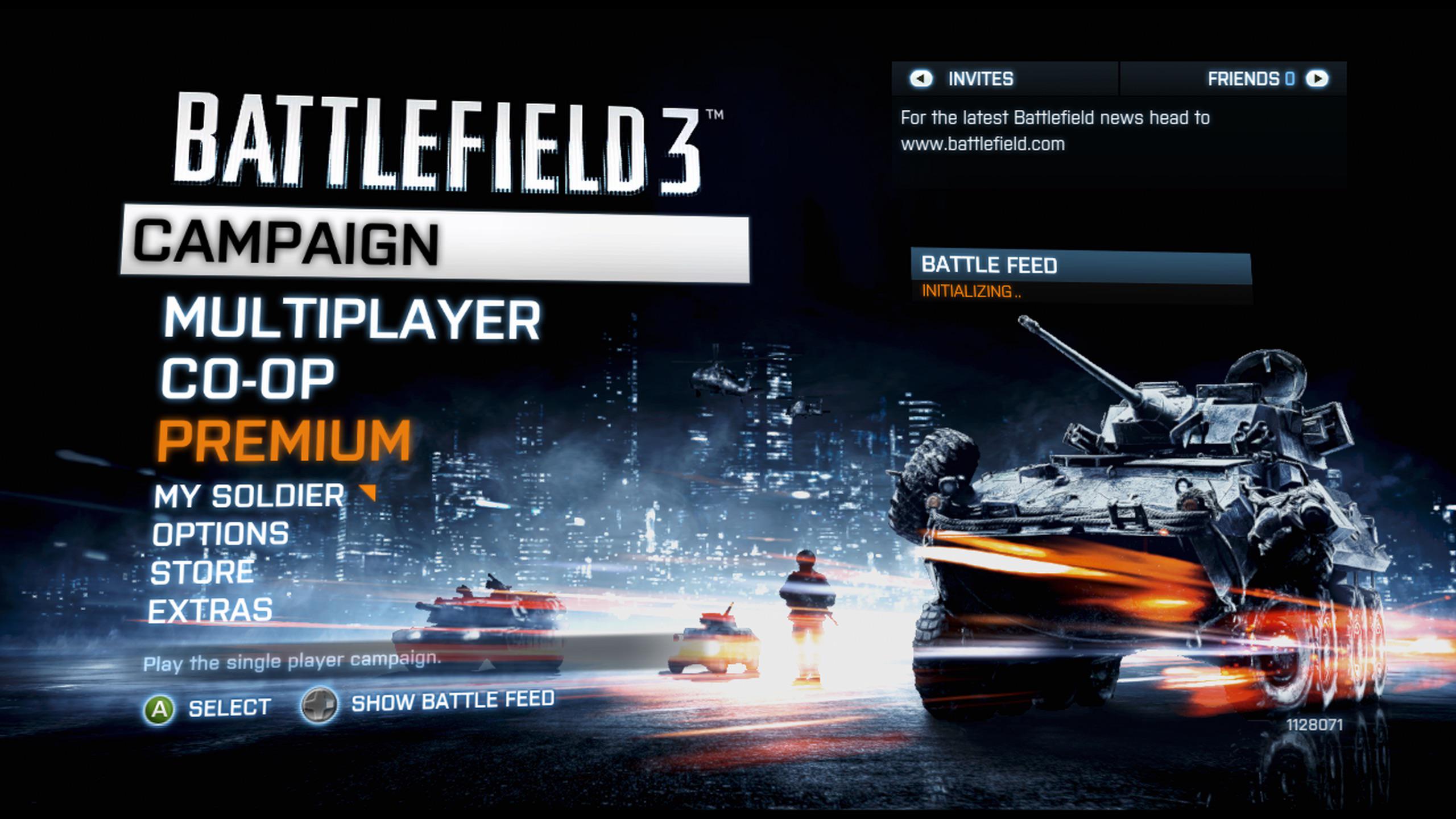
List of buttons (Battlefield 3)
List of buttons (Battlefield 3)
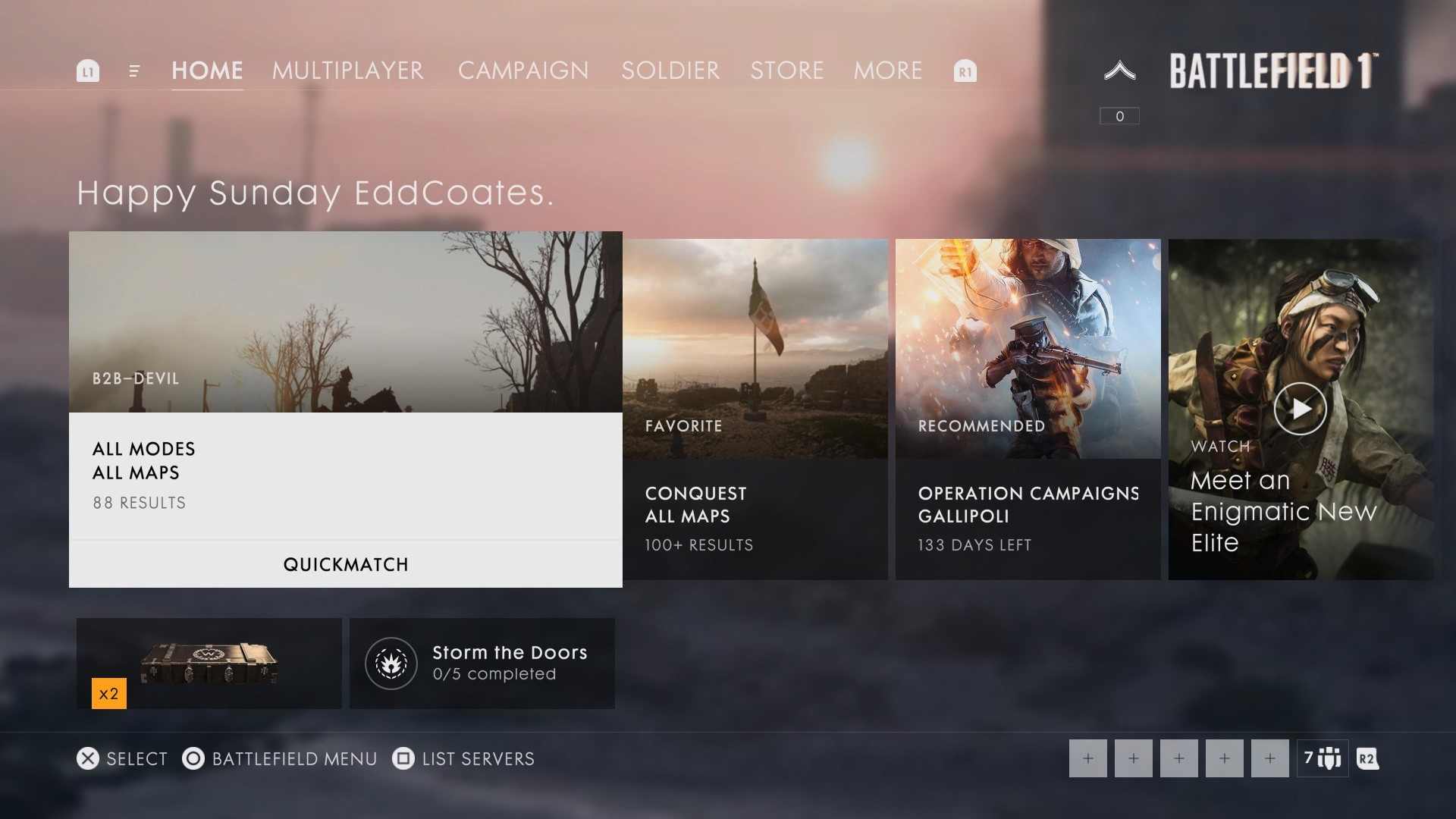
Game modes in tiles (Battlefield 1)
Game modes in tiles (Battlefield 1)
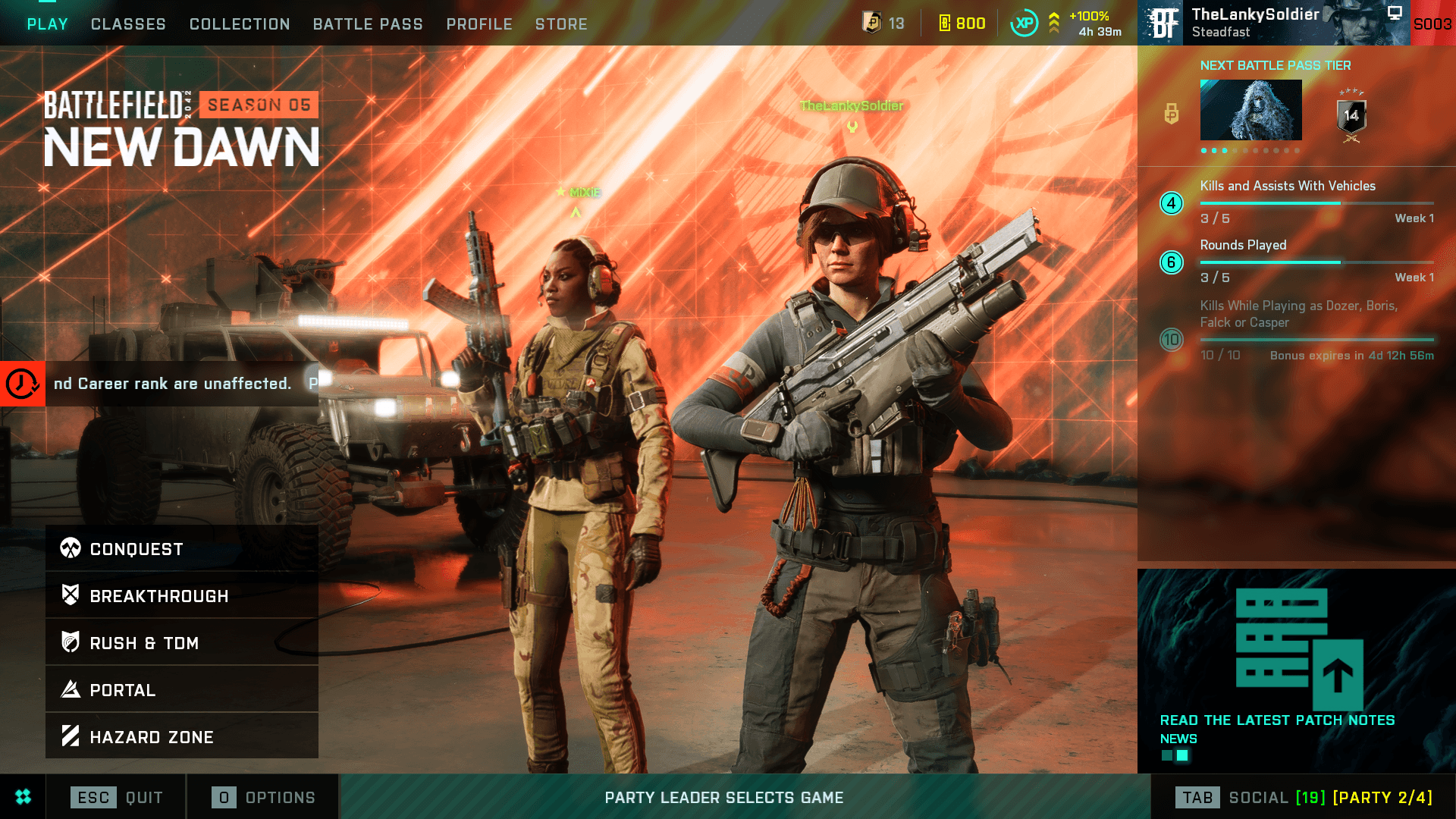
Game mode and Play buttons (Battlefield 2042)
Game mode and Play buttons (Battlefield 2042)
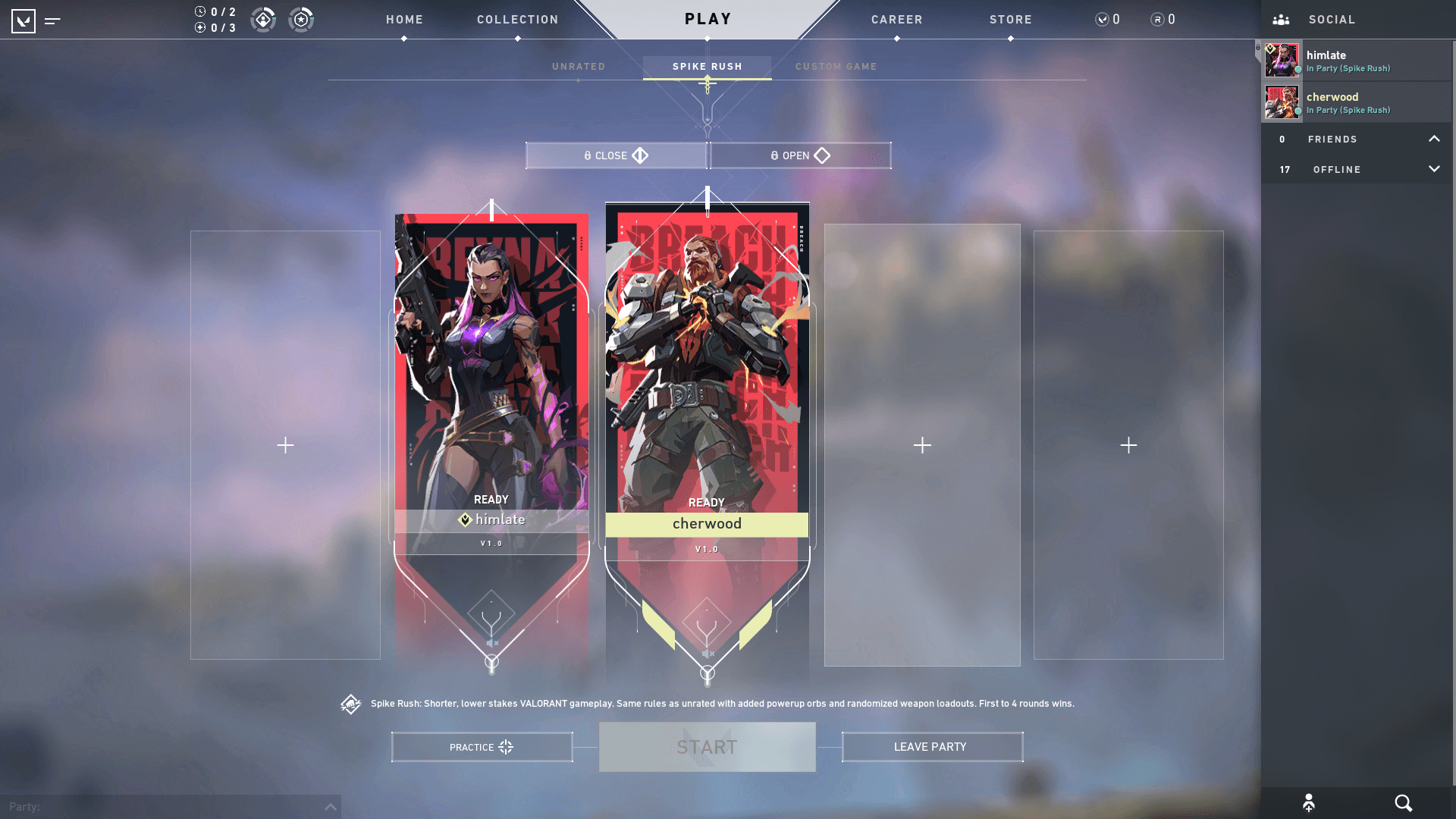
Game modes in carousel (Valorant)
Game modes in carousel (Valorant)
I identified a few common approaches to main menu design in this space:
List-based menus - Modes presented as a vertical or horizontal text list. Minimal visual footprint, highly functional, but less visually engaging.
Full-screen tile grids - Game modes dominate the screen as large visual tiles. Used by Battlefield 6's beta, Battlefield 3, 4, and 1 after a UI redesign and streaming-style interfaces. Prioritizes visual impact and console players over efficiency.
Compact game mode selection with open space - Mode selection is condensed into a smaller area, leaving room for other content. Used by Battlefield 2042, Apex Legends, and Marvel Rivals.
Lobby-centric with carousel selection - The player lobby takes a center stage, with game modes accessible through small carousels above or below. Used by Valorant. Prioritizes social presence and party formation over mode browsing.
I chose to pursue the compact navigation approach. It directly supports my goal of merging the bulletin and lobby screens; the open space gives me room to integrate both without sacrificing readability.
I identified a few common approaches to main menu design in this space:
List-based menus - Modes presented as a vertical or horizontal text list. Minimal visual footprint, highly functional, but less visually engaging.
Full-screen tile grids - Game modes dominate the screen as large visual tiles. Used by Battlefield 6's beta, Battlefield 3, 4, and 1 after a UI redesign and streaming-style interfaces. Prioritizes visual impact and console players over efficiency.
Compact game mode selection with open space - Mode selection is condensed into a smaller area, leaving room for other content. Used by Battlefield 2042, Apex Legends, and Marvel Rivals.
Lobby-centric with carousel selection - The player lobby takes a center stage, with game modes accessible through small carousels above or below. Used by Valorant. Prioritizes social presence and party formation over mode browsing.
I chose to pursue the compact navigation approach. It directly supports my goal of merging the bulletin and lobby screens; the open space gives me room to integrate both without sacrificing readability.
SKetches
Main Menu
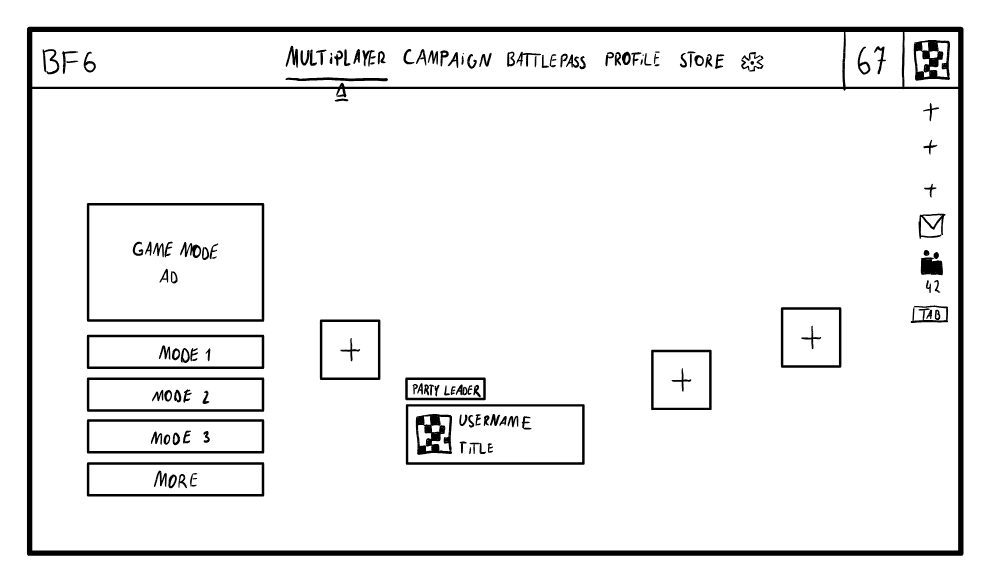
First sketch
First sketch
When drawing my first sketch I was mainly inspired by the original Battlefield 6 lobby screen and the buttons from Battlefield 2042. I really liked how compact and quick their main menu is, because it allows the player to get to the selected game mode in 2 simple clicks. However, after paying more attention to this sketch, I noticed that I made some decisions that could potentially degrade the player experience and disrupt the player flow.
I completely got rid of the bulletin section, present in BF6 main menu, and replaced it with the small ad on top of the stack of buttons. After some pondering, I decided that this design makes the ad less important and could evoke the feeling of an obnoxious ad that you cannot hide or close.
Another thing is giving the campaign mode its own section in the carousel on top of the screen. BF6's players usually either play this mode once or completely skip playing the campaign in favor of playing the multiplayer modes. Including it there could be a waste of space after the player play through it once and could annoy the console players who would be forced the click through this game mode in the carousel. One of the solutions I already thought up is the BF1 approach, where I could tuck the campaign mode away as the last position in the carousel before the setting, but I though that I could come up with something better.
When drawing my first sketch I was mainly inspired by the original Battlefield 6 lobby screen and the buttons from Battlefield 2042. I really liked how compact and quick their main menu is, because it allows the player to get to the selected game mode in 2 simple clicks. However, after paying more attention to this sketch, I noticed that I made some decisions that could potentially degrade the player experience and disrupt the player flow.
I completely got rid of the bulletin section, present in BF6 main menu, and replaced it with the small ad on top of the stack of buttons. After some pondering, I decided that this design makes the ad less important and could evoke the feeling of an obnoxious ad that you cannot hide or close.
Another thing is giving the campaign mode its own section in the carousel on top of the screen. BF6's players usually either play this mode once or completely skip playing the campaign in favor of playing the multiplayer modes. Including it there could be a waste of space after the player play through it once and could annoy the console players who would be forced the click through this game mode in the carousel. One of the solutions I already thought up is the BF1 approach, where I could tuck the campaign mode away as the last position in the carousel before the setting, but I though that I could come up with something better.
Final sketches
Final sketches
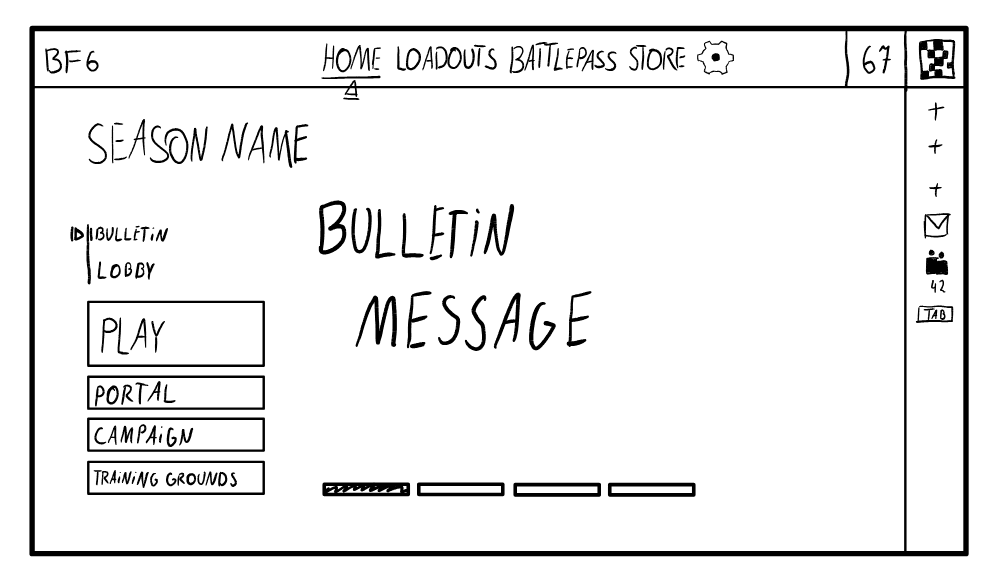
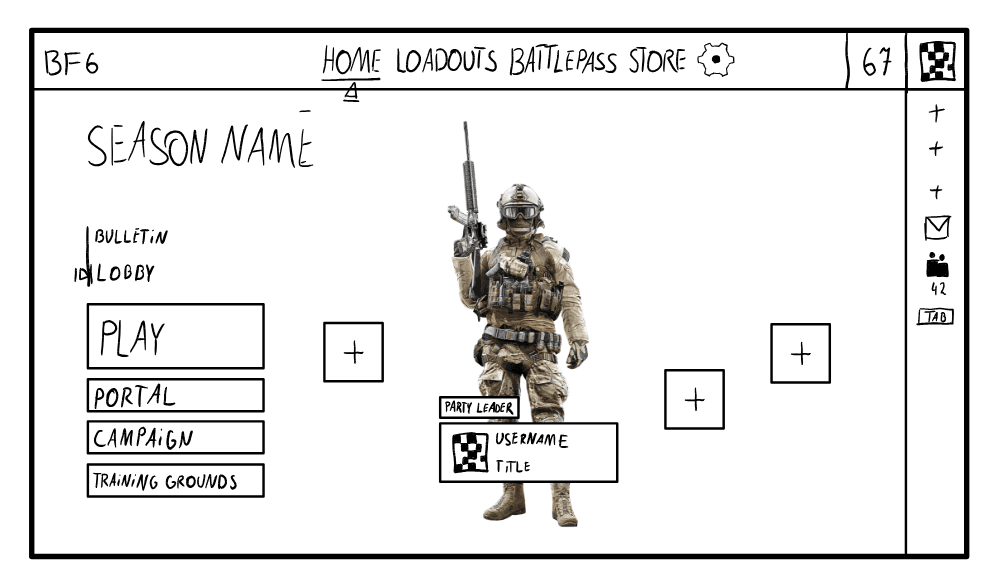
After some back-and-forth and iterations, I ended up with the main menu layout presented above. I combined previous reflections and adjusted the sketch.
Instead of the ad on top of the button stack, I included the bulletin from the original design. It would act as a changeable background for the main menu, where based on the current selection either a bulleting or a lobby would be selected. It would make the bulletin as important in the original design and would not block the player from clicking a button and selecting a game mode. On console it would be possible to switch between those 2 options with a button press.
I moved the campaign mode and included it in the main menu screen. Now it will still be visible for the player and not break the flow for the console players.
After some back-and-forth and iterations, I ended up with the main menu layout presented above. I combined previous reflections and adjusted the sketch.
Instead of the ad on top of the button stack, I included the bulletin from the original design. It would act as a changeable background for the main menu, where based on the current selection either a bulleting or a lobby would be selected. It would make the bulletin as important in the original design and would not block the player from clicking a button and selecting a game mode. On console it would be possible to switch between those 2 options with a button press.
I moved the campaign mode and included it in the main menu screen. Now it will still be visible for the player and not break the flow for the console players.
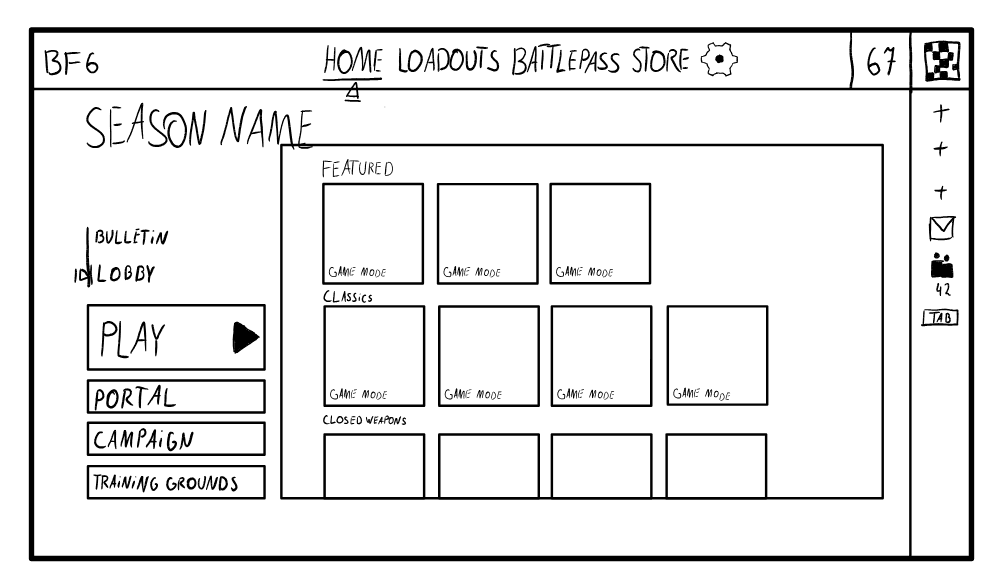
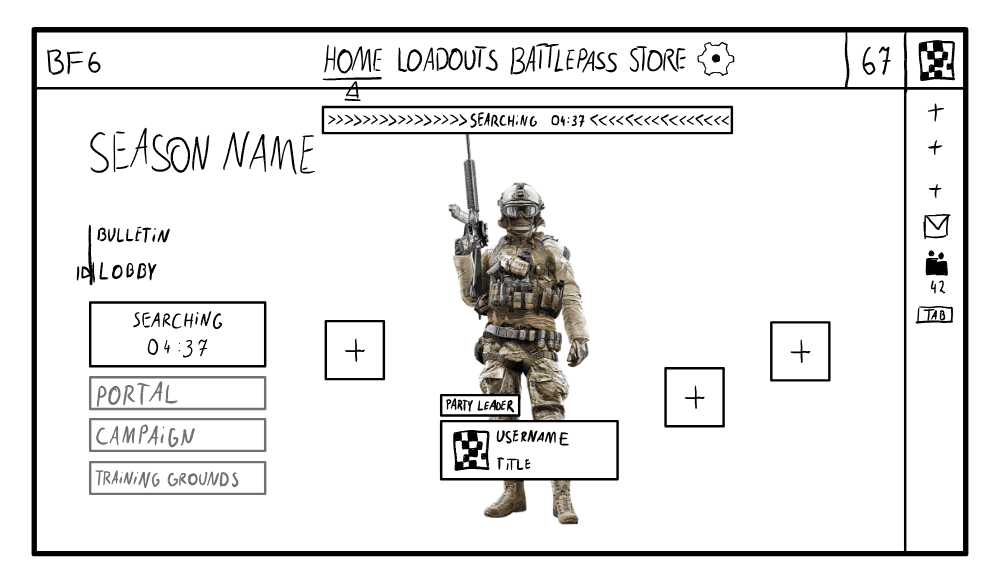
Matchmaking screen flow sketch
Matchmaking screen flow sketch
My vision for mode selection is a shelf or an overlay that appears after pressing a "Play" button. It would showcase all available modes within the same screen, reducing confusion about where the player is in the menu. This approach is also practical for a live-service game; the shelf can expand to accommodate post-launch additions without requiring a layout redesign. Visually, it maintains tile-based elements for console usability while moving away from the streaming service aesthetic that the original design evokes.
My vision for mode selection is a shelf or an overlay that appears after pressing a "Play" button. It would showcase all available modes within the same screen, reducing confusion about where the player is in the menu. This approach is also practical for a live-service game; the shelf can expand to accommodate post-launch additions without requiring a layout redesign. Visually, it maintains tile-based elements for console usability while moving away from the streaming service aesthetic that the original design evokes.
Other Sketches
Below I include my other final sketches that went through similar process as described above. I would love to expand on this, however this would make this Case Study unnecessarily long.
Below I include my other final sketches that went through similar process as described above. I would love to expand on this, however this would make this Case Study unnecessarily long.
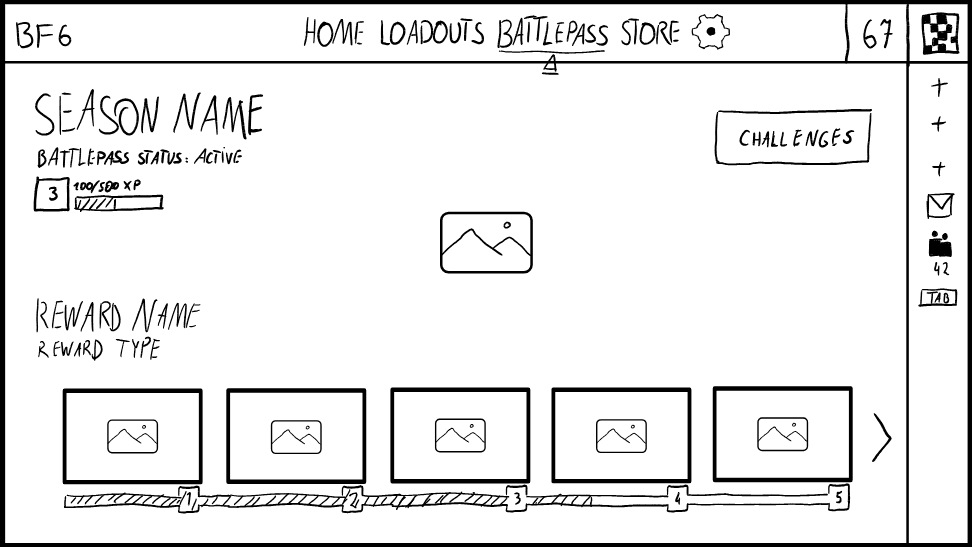
Battlepass Screen
Battlepass Screen
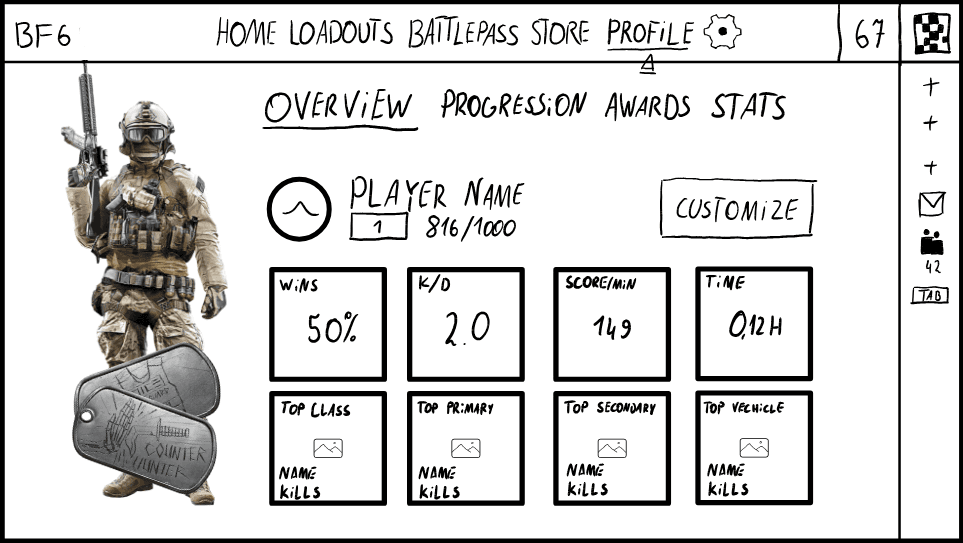
Player Profile
Player Profile
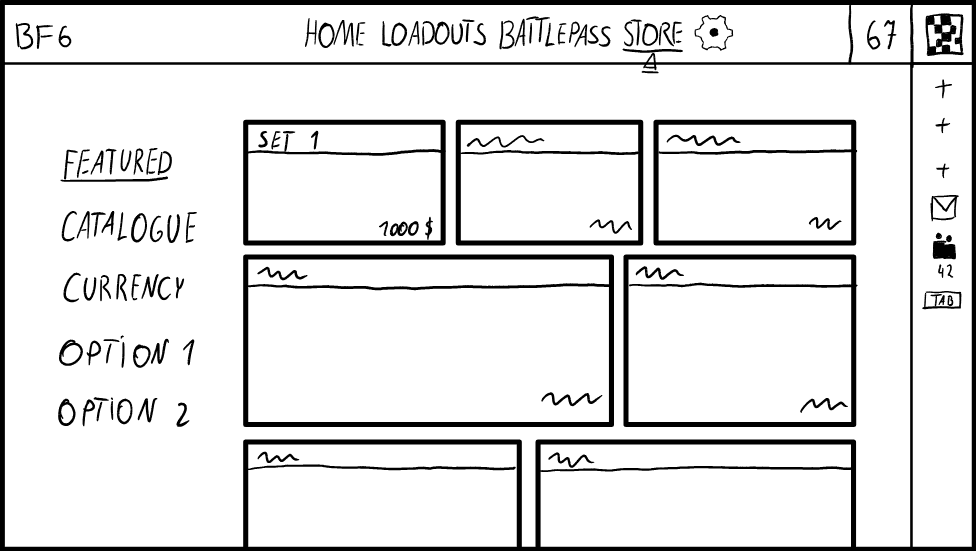
Store
Store
First Figma Designs
After finishing my sketches, I moved into Figma and began building the designs.
Before showing the work, I want to be transparent about my process. Working solo and eager to see results, I skipped proper wireframing and jumped into high-fidelity assets too quickly. This shortcut really backfired on me. Issues that should have been resolved at the wireframe stage, like object scale, screen composition or visual hierarchy only became apparent after I'd already committed to detailed assets. Fixing them took longer than building proper wireframes would have in the first place.
After finishing my sketches, I moved into Figma and began building the designs.
Before showing the work, I want to be transparent about my process. Working solo and eager to see results, I skipped proper wireframing and jumped into high-fidelity assets too quickly. This shortcut really backfired on me. Issues that should have been resolved at the wireframe stage, like object scale, screen composition or visual hierarchy only became apparent after I'd already committed to detailed assets. Fixing them took longer than building proper wireframes would have in the first place.
Lesson learned: Wireframes exist to catch structural problems cheaply. Skipping them doesn't save time; it moves the cost to a stage where everything takes longer to adjust. In a studio environment, review checkpoints would have caught these issues before I started working in high-fidelity. Since I worked alone, I was not able to do so.
Lesson learned: Wireframes exist to catch structural problems cheaply. Skipping them doesn't save time; it moves the cost to a stage where everything takes longer to adjust. In a studio environment, review checkpoints would have caught these issues before I started working in high-fidelity. Since I worked alone, I was not able to do so.
This experience gave me a clearer understanding of why studios structure their pipelines the way they do, and why each phase deserves its own time before moving forward.
This experience gave me a clearer understanding of why studios structure their pipelines the way they do, and why each phase deserves its own time before moving forward.
Compare this first Figma Design with the final sketch by sliding the arrow to the right
Compare this first Figma Design with the final sketch by sliding the arrow to the right
Above is a comparison between my final sketch and my first Figma design. Most design decisions from the sketch translated over, but the execution has clear issues. Scale is inconsistent, the composition feels off, and several elements need refinement. Had I started with a wireframe, I would have caught most of these problems before committing to detailed assets.
Below are other early Figma designs I created during this project.
Above is a comparison between my final sketch and my first Figma design. Most design decisions from the sketch translated over, but the execution has clear issues. Scale is inconsistent, the composition feels off, and several elements need refinement. Had I started with a wireframe, I would have caught most of these problems before committing to detailed assets.
Below are other early Figma designs I created during this project.
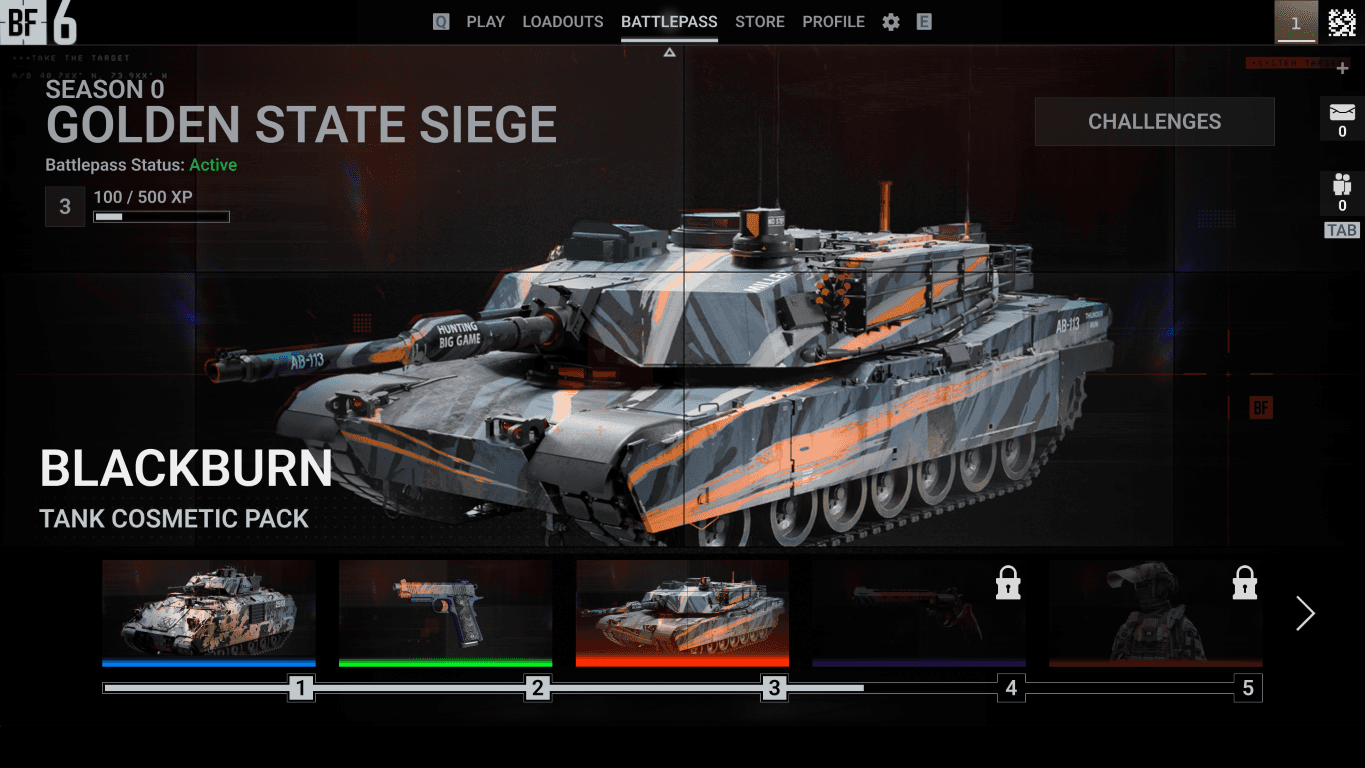
Battlepass Screen first Figma design
Battlepass Screen first Figma design
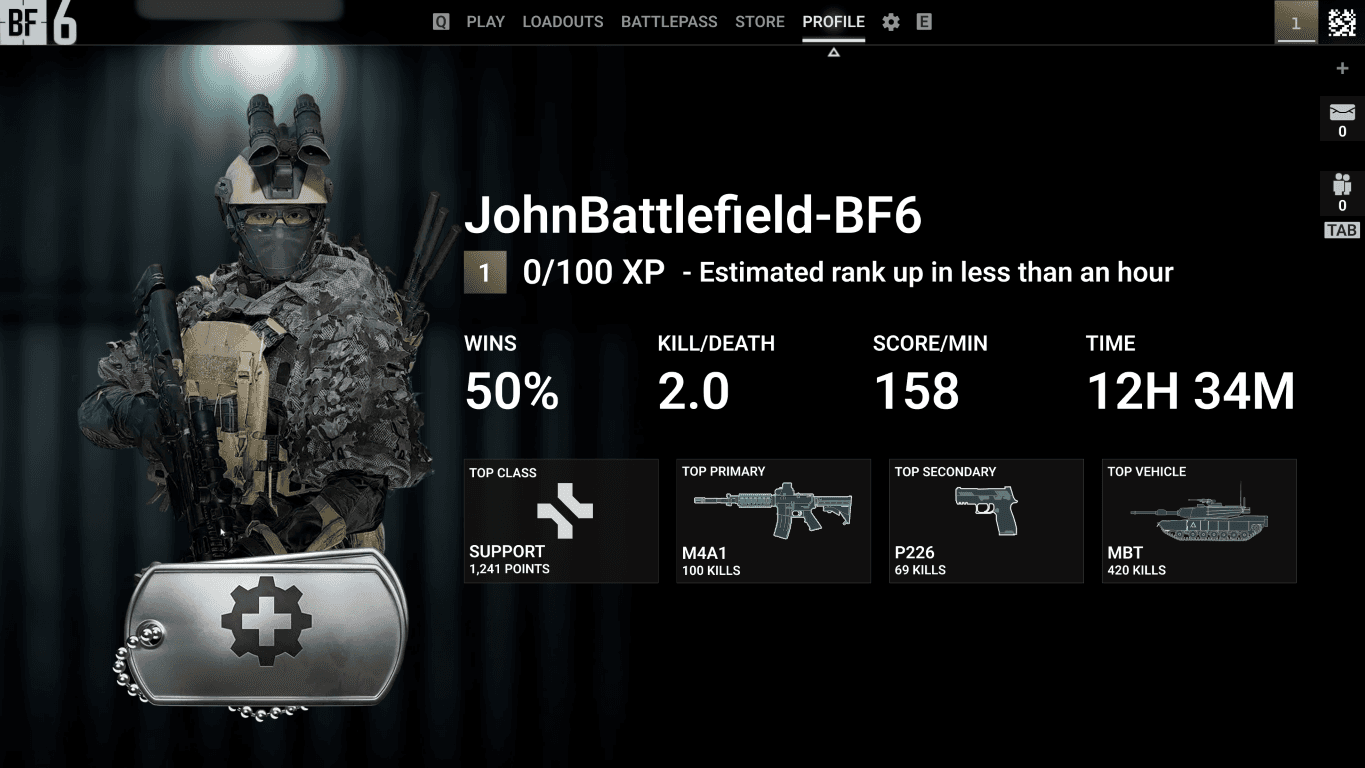
Player Profile first Figma design
Player Profile first Figma design
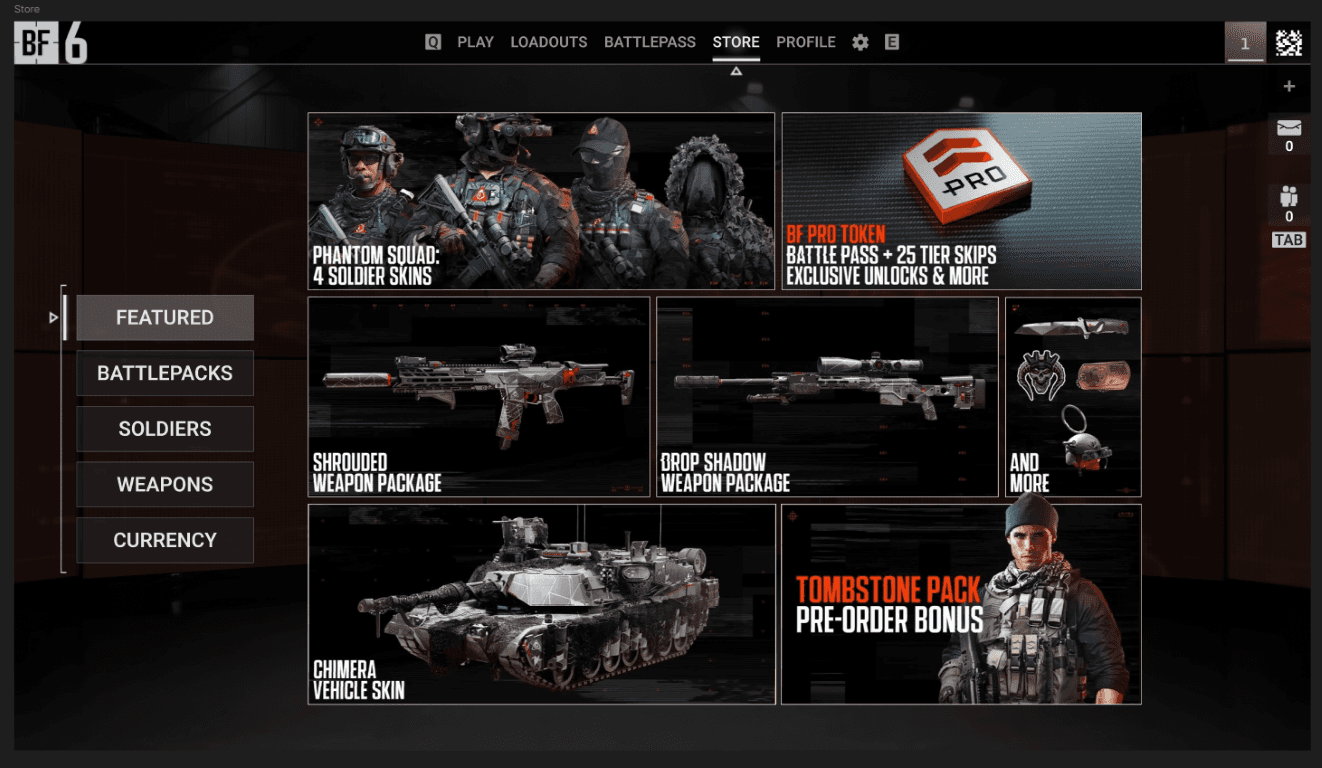
Store first Figma design
Store first Figma design
Work Smarter, not harder
While building these designs, I struggled to replicate the look and feel of Battlefield 6's lobby. Recreating the atmospheric background from scratch was proving difficult and time-consuming. Then I realized I was solving the wrong problem.
Instead of recreating the background, I could simply borrow it. I took a screenshot of the game's lobby and used AI tools to remove the original UI elements. After several passes, I achieved a clean result that preserved the game's background without manual recreation or compromising the quality.
While building these designs, I struggled to replicate the look and feel of Battlefield 6's lobby. Recreating the atmospheric background from scratch was proving difficult and time-consuming. Then I realized I was solving the wrong problem.
Instead of recreating the background, I could simply borrow it. I took a screenshot of the game's lobby and used AI tools to remove the original UI elements. After several passes, I achieved a clean result that preserved the game's background without manual recreation or compromising the quality.
Lobby
Lobby
Loadout Screen
Loadout Screen
Final Results
After working through the issues and refining each screen, the designs reached a state I was satisfied with. Below is a comparison between my initial sketches and the final Figma designs.
After working through the issues and refining each screen, the designs reached a state I was satisfied with. Below is a comparison between my initial sketches and the final Figma designs.
Main Menu - Bulletin
Main Menu - Bulletin
Main Menu - Lobby
Main Menu - Lobby
Battlepass Screen
Battlepass Screen
Player Profile
Player Profile
Store
Store
The core layout decisions from the sketches survived into the final versions. What changed was the execution: more consistent scale, clearer visual hierarchy, and refined details that only became apparent through iteration.
Looking at these side by side reinforces the earlier lesson. The sketches captured the right ideas, but translating them effectively required a level of refinement that wireframes would have helped me reach faster. The gap between sketch and final design is where most of my time went; time that could have been reduced with a more disciplined process.
The core layout decisions from the sketches survived into the final versions. What changed was the execution: more consistent scale, clearer visual hierarchy, and refined details that only became apparent through iteration.
Looking at these side by side reinforces the earlier lesson. The sketches captured the right ideas, but translating them effectively required a level of refinement that wireframes would have helped me reach faster. The gap between sketch and final design is where most of my time went; time that could have been reduced with a more disciplined process.
Result
After combining all of the high-fidelity sketches in Figma, I turned them into a Figma prototype. This prototype can be tried out below.
After combining all of the high-fidelity sketches in Figma, I turned them into a Figma prototype. This prototype can be found here or on the desktop version of this page.
After combining all of the high-fidelity sketches in Figma, I turned them into a Figma prototype. This prototype can be found here or on the desktop version of this page.
Interactable Prototype
Key Takeaways
This project taught me more through its mistakes than its successes.
Wireframes are not optional. I understood their purpose in theory before this project. Now I understand it in practice. Skipping them didn't save time; it relocated the work to a stage where every adjustment cost more. In a team environment, review stages catch these problems early. Working solo, I had to catch them myself; after they had already cost me hours. I won't skip this step again.
UI design improves through doing. This project forced me to make decisions, see them fail, and understand why. My eye for visual hierarchy, spacing, and consistency is sharper now than when I started. The gap between my first Figma designs and the final versions is proof of that growth.
After finishing this project I really want to start a anew and apply what I learned. This project exposed gaps in my process I didn't know existed. Next time I will try to implement a proper workflow from the start: thorough research, validated wireframes, and structured progression to high-fidelity.
This project taught me more through its mistakes than its successes.
Wireframes are not optional. I understood their purpose in theory before this project. Now I understand it in practice. Skipping them didn't save time; it relocated the work to a stage where every adjustment cost more. In a team environment, review stages catch these problems early. Working solo, I had to catch them myself; after they had already cost me hours. I won't skip this step again.
UI design improves through doing. This project forced me to make decisions, see them fail, and understand why. My eye for visual hierarchy, spacing, and consistency is sharper now than when I started. The gap between my first Figma designs and the final versions is proof of that growth.
After finishing this project I really want to start a anew and apply what I learned. This project exposed gaps in my process I didn't know existed. Next time I will try to implement a proper workflow from the start: thorough research, validated wireframes, and structured progression to high-fidelity.